

How to download the roAmigo invoice?
If you’re wondering how to see your roAmigo invoice, the process is easy and quick. Simply fill out the form with your details, and you’ll receive your roAmigo invoice right away at the email you provided. Just a heads-up, the invoice is a formal payment request, while the receipt confirms your payment. If you need to download your roAmigo invoice or check the receipt, we’ll guide you through the process easily.
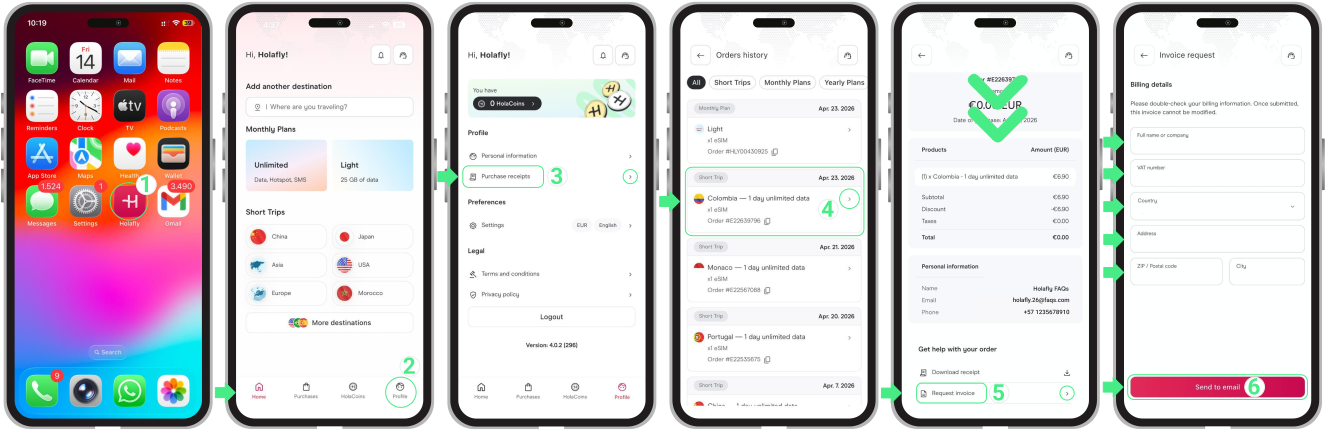
To download your roAmigo invoice:
- Go to the roAmigo Website → Tap on Profile → Tap on Purchase receipts → Select the order for which you need the invoice → Scroll down to the Get help with your order section and choose Request Invoice → Review your information before submitting the request (you can modify it if needed) → Finally, tap Send to email.
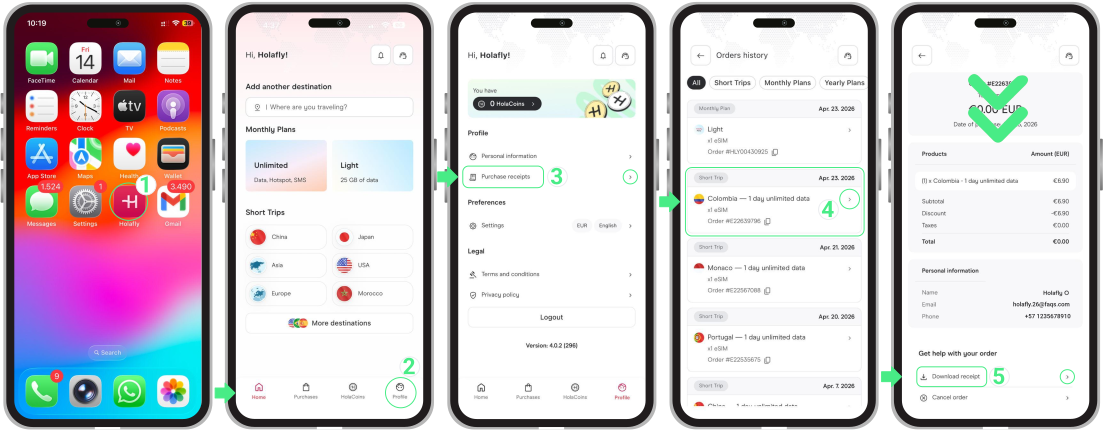
To access your roAmigo purchase receipts:
- Go to the roAmigo Website → Tap on Profile → Tap on Purchase receipts → Select the order for which you need the receipt → Scroll down to the Get help with your order section and choose Download receipt → Choose a location to save the file.
To keep in mind
- If you need to make any changes to your roAmigo invoice, please contact us with the necessary details at roamigo@roamigoesim.com
- If you’re no longer a roAmigo customer but need an invoice or receipt, you can still access your account using the same purchase email.
- Make sure to fill in your personal information accurately to avoid delays in receiving your invoice.
- Your invoice will be sent to the provided email in PDF format.